CRM Bill Intelligence

Billing Intelligence Embedded in CRM Workflows

Give contact center agents the context needed to investigate complex charges, explain bill changes and resolve inquiries without switching between systems.

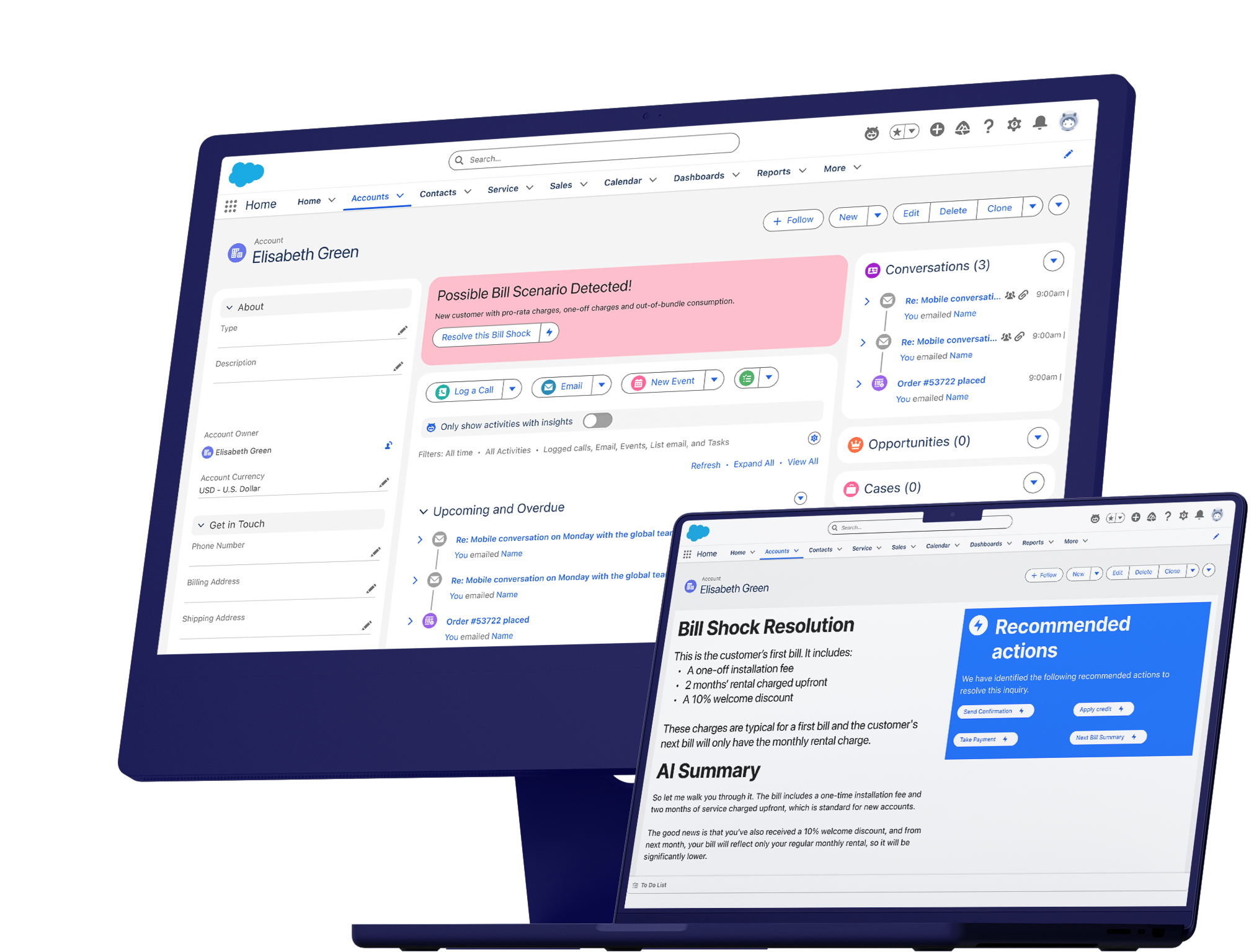
Rich billing intelligence embedded in Salesforce screens to reduce average handle time


Billing Intelligence on Agent Desktops


CRM Bill Intelligence embeds established billing context directly into the agent’s existing desktop, reducing the need to search across bills, transactions and supporting systems during a customer interaction.

Agents can identify material bill changes, compare billing periods and investigate charges without leaving the customer record. This shortens investigation time, supports more consistent explanations and can reduce average handle time and escalation. When customers move between digital and assisted channels, agents can draw on the same shared billing intelligence, helping maintain a consistent explanation across the journey.

Relevant commercial signals, including bill-shock risk, payment risk and churn risk, can also be surfaced for the agent, helping identify when an inquiry may require action beyond explanation. CRM Bill Intelligence adds this context within the existing service environment while CRM and billing platforms continue to own customer records, calculations and business rules.

Contact Center Outcomes

Faster bill inquiry resolution shown with a timer icon
Reduce Average Handle Time

Give agents established billing context without requiring investigation across multiple systems

70 %
Increase in Agent Productivity

Successfully demonstrated through Calvi’s TM Forum Catalyst using a live real customer billing scenario

Reduce OPEX shown with a dollar sign and downward arrow icon
Identify Revenue Risk Earlier

Surface relevant payment, churn and commercial signals during customer billing interactions

Resolve Complex Billing Inquiries in the CRM

Apply established billing context within existing agent workflows to support faster resolution and informed follow-up.

  • Explain Bill Changes
    Show agents what changed, why it changed and the impact on current and future charges.

  • Compare Billing Periods
    Compare bills, usage, adjustments and customer events without searching across multiple systems.

  • Act on Relevant Signals
    Surface bill shock, payment, churn and commercial signals within the customer interaction.

Agent Workflow Capabilities

  1. Established Billing Context
    Bring current and historical bills, customer events and identified scenarios together within the CRM record.

  2. Consistent Bill Interpretation
    Use the same established context across agents, AI systems and digital channels to support consistent explanations.

  3. Flexible CRM Integration
    Integrate with Salesforce, ServiceNow and other agent environments through APIs and configurable connectors.

CRM Bill Intelligence FAQ


What is CRM Bill Intelligence?
CRM Bill Intelligence brings established billing context from Bill Experience Hub™ into existing CRM screens and workflows. It equips agents to investigate charges, understand bill changes and explain complex bills without reconstructing the answer from multiple systems.
What makes complex billing inquiries difficult for agents?
Agents may have access to the bill and underlying transactions, but not the established context needed to explain how charges, discounts, adjustments and customer events relate. This can force them to investigate manually across multiple screens during the interaction.
What billing context is made available within the CRM?
Agents can access current and historical bill comparisons, material bill changes, customer events, identified billing scenarios and relevant commercial signals. This provides the context needed to understand what changed and explain the impact on the customer's bill.
How can CRM Bill Intelligence reduce average handle time?
Established billing context is presented within the agent workflow, reducing the need to search across systems or interpret transactions manually. Agents can investigate the inquiry and reach the relevant explanation more efficiently.
How does CRM Bill Intelligence support first-contact resolution?
Agents receive consistent billing facts, change analysis and scenario explanations during the interaction. This can reduce unnecessary escalation, repeat investigation and subsequent customer contact.
How does CRM Bill Intelligence support consistent explanations across channels?
Agents use the same established billing intelligence that can support digital channels and AI interactions. When customers move between self-service and assisted support, the underlying explanation can remain consistent across the journey.
How does CRM Bill Intelligence integrate with CRM platforms?
Billing context can be integrated into Salesforce, ServiceNow and other agent environments through APIs and configurable connectors. The information is presented within existing customer records and service workflows.
Can CRM Bill Intelligence support CRM AI and agent-assist tools?
Yes. Established billing context can be provided to CRM AI and agent-assist capabilities so generated explanations are grounded in consistent billing facts and identified scenarios rather than raw transactions alone.
How is CRM Bill Intelligence different from billing analytics?
Billing analytics primarily examines aggregated performance, patterns and trends. CRM Bill Intelligence applies customer-specific billing context within an active service workflow so an agent or AI system can investigate and explain an individual bill.
How does CRM Bill Intelligence support revenue protection?
CRM Bill Intelligence can surface commercial signals such as bill-shock risk, payment risk, churn risk and potential revenue leakage within the agent workflow. This helps authorized teams identify when an inquiry may require retention, collections or commercial follow-up.
Does CRM Bill Intelligence replace existing CRM or billing platforms?
No. Existing billing and BSS systems remain authoritative for calculations, rules and decisions, while the CRM continues to manage the customer workflow. CRM Bill Intelligence adds the established context needed to understand and explain the bill.


Further Reading